Updating EmpTech

The history of EmpTech goes back a long way and the team has dispersed to take up different jobs. However, we are keeping this site because it has happy memories linked to Assistive Technology and we still have the same aims in life about supporting technology that works for everyone.

Welcome Communication and At

One project involves the development of Global Symbols. It has a repository of professionally designed communication symbols for education, healthcare, and accessibility. The number of symbol collections is growing as you can design new symbols with AI-powered tools that adapt to your specific needs and cultural contexts. It is also possible to edit them using Symbol Designer and create custom communication charts using Board Builder.

board with Kenyan and Pakistan symbols

Content offered on the Global Symbols Moodle site is free and has a Creative Commons Licence. In order to access the training resources and activities please create an account.

Unicef Logo Banner

Developed in Partnership with UNICEF

Courses based on themes

AAC Training (6) – Trening o PK na hrvatskom (8) – AAK Trening Srbija (8)

Courses based on prior skill / knowledge levels

AAC Guided Pathways (3) – Пътеводител на ДАК (5) – Патоказ кон ААК (3)

Extra Resources and Instructions

AAC Resources & Board Builder (1) – Symbol Voting Instructions (en, hr, sr) (3)

Churchill Fellowship Logo Banner

Supported by a Churchill Fellowship COVID-19 Action Fund

Communication using Symbols – A Carer’s Training Pack (1)

One module about Communication using Symbols with five steps that can be dipped into at any stage and need no prior knowledge. They include:

  • How we communicate – Managing conversations – Finding the right words and images – Adapting images and symbols for each individual – Creating opportunities to encourage conversations.

There are some activities, case studies and examples of communication boards and information charts with most steps and the entire Carer’s Training Pack can be downloaded

Learning more about Generative AI and AAC symbols

The complexities of creating symbols for communication and the way they work to support spoken and written language has never been easy. Ideas around guessability or iconicity and transparency to aid learning or remembering are jut one side of the coin in terms of design. There are also the questions around style, size, type of outlines and colour amongst many other design issues that need to be carefully considered and the entire schema or set of rules that exist for a particular AAC symbol set. These are aspects that are rarely discussed in detail other than by those developing the images.

However, when trying to work with computer algorithms to make adaptations from one image to another a starting point can be image to text recognition in order to discover how well chosen training data is going to work. It is possible to see if the systems can deal with the lack of background and other details that normally help to give images context, but are often lacking in AAC symbol sets. The computer has no way of knowing whether an animal is a wolf or dog unless there are additional elements, such as a collar or a wild natural area around the animal such as a forest compared to a room in a house. If it is possible to provide a form of alternative text as a visual description, not disimilar to that used by screen reader users when viewing images on web pages, the training data provided may then work for an image to image situation.

There remains the need to gather enough data to allow the AI systems to try to predict what it is you want. The systems used by Stable Diffusion and DALL-E 2 have scraped the web for masses of images in various styles, but they do not seem to have picked up on AAC symbol sets! There is also the case that each symbol topic category within the symbol set tends to have different styles even though the outlines and some colours may be similar and humans are generally able to recognise similarities within a symbol set that cannot necessarily be captured by the AI model that has been developed. More tweaks will always be needed along with more data training as the outcomes are evaluated.

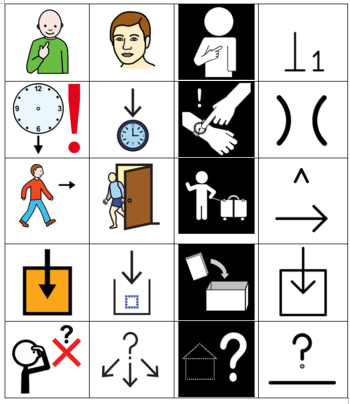
Comparison of symbol sets

The image above compares groups of symbols from the ARASAAC, Mulberry, Sclera and Blissymbolics sets.

The other problem is that most generative artificial intelligence (AI) systems using something like Stable Diffusion and DALL-E 2 are designed to provide unique images in a chosen style, even when you enter the same text prompt. Therefore each outcome will look different to your first or second attempt. In other words there is very little consistency in how the details of the picture may be put together other than the overview will look as if it has a certain style. So if you put in the text prompt edit box that you want “A female teacher in front of a white board with a maths equation”, the system can generate as many images as you want, but none will be exactly the same.

A female teacher in front of a white board with a math equation

Created using DALL-E 2

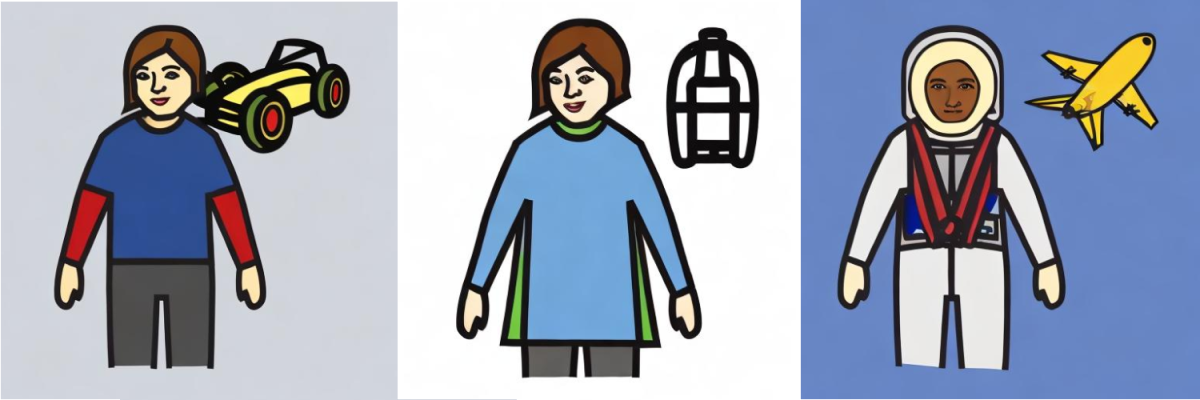
Nevertheless, Chaohai Ding has managed to create examples of AI generated Mulberry AAC symbols by using Stable Diffusion with the addition of Dreambooth that uses a minimal number of images in a more consistent style. There are still multiple options available from the same text prompt, but the ‘look and feel’ of those automatically generated images makes us want to go on working with these ideas in order to support the idea of personalised AAC symbol adaptations.

racing driver friend and astronaut

In the style of the professions category in the Mulberry Symbol set these three images had the text prompt of racing driver, friend and astronaut.

We would like to thank Steve Lee for allowing us to use the Mulberry Symbol set on Global Symbols and the University of Southampton Web Science Institute Stimulus Fund for giving us the chance to collaborate on this project with Professor Mike Wald’s team.

Tenth Global Accessibility Awareness Day (GAAD) May 20, 2021

Over the last few years there has been a general move towards seeing how AI can help individuals involved with digital accessibility overcome some of the barriers faced by those with disabilities.  The use of machine learning can also provide access via assistive technologies that have been improved to such an extent that they are needing less and less human intervention.  Examples include automatic captioning on videos such as those presented on YouTube and speech recognition.

The question is whether we have really moved on from Deque’s 2018 “Five Ways in Which Artificial Intelligence Changes the Face of Web Accessibility”.

These included: 

  • Automated image recognition,
  • Automated facial recognition,
  • Automated lip-reading recognition,
  • Automated text summarization,
  • Real-time, automated translations.

Visiting the GAAD events page  is often a good way to find out as many companies and organisations world wide share what they have achieved over the year, such as Google with its Machine Learning for Accessibility where they discuss Voice Access, Lookout, and Live Transcribe along with Sound Notifications for Android on May 19, 8:15 PM and Microsoft with its AI powered 365 event and others also listed on the Access 2 Accessibility site. 

There is an AI for Accessibility Hackathon (Virtual) on May 24th – June 29th 9-10am BST (Beirut, Lebanon) run by the ABLE CLUB American University Of Beirut.  This competition is aimed at rallying talents and fostering the regional development of the innovative entrepreneurship community related to artificial intelligence while also increasing social inclusiveness.

AccessiBe.com uses machine learning and computer vision technologies for image recognition and OCR as it scans web pages for accessibility issues, just as our Group Design Project team used similar technologies on Web2Access to highlight alt tags that were possibly a poor representation of an image on a website and where overlaps occurred when zoom was used as well as a visualisation of a site on a mobile phone if it failed WCAG guidelines.  

However, still to come is Apple’s use of AI for screen recognition on iOS 14, where it “uses on-device intelligence to recognize elements on your screen to improve VoiceOver support for app and web experiences” such as detecting and identifying “important sounds such as alarms, and alerts you to them using notifications.”

So let’s all celebrate the improvements in digital accessibility that AI can bring, whilst making sure that one day there will be no need to have an AccessiBe YouTube video about “why web accessibility matters.”  It will just be something we can take for granted!  Equal Access for All. 

Winston Churchill Memorial Trust Covid-19 Action Fund support symbol charts

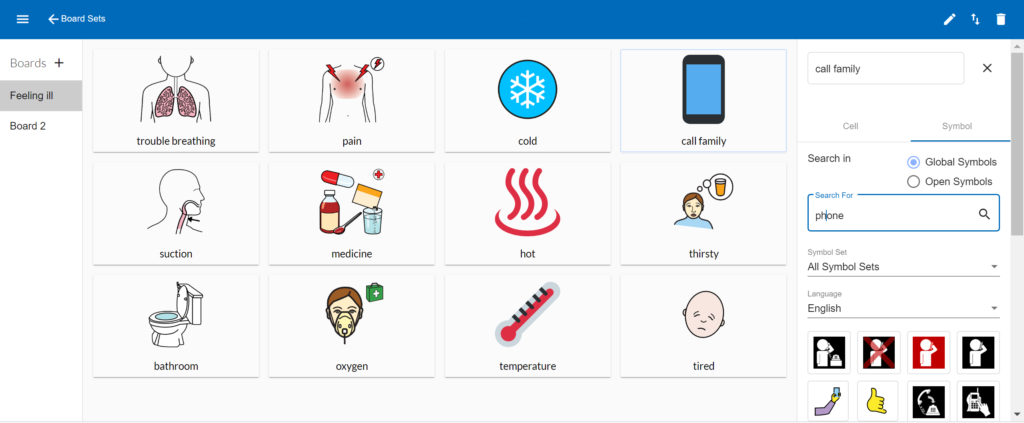
boardbuilder beta version
Freely available Boardbuilder, about to be updated as version 3. Due to be developed for personalised COVID-19 information support to aid communication with different templates and improved symbol searches.

Thank you ‘Winston Churchill Memorial Trust Covid-19 Action Fund‘ for making it possible for us to develop our Boardbuilder for personalising and adapting symbols for easy to use communication and information charts. Many freely available Augmentative and Alternative Communication (AAC) symbols are developed for children rather than adults. There are also many COVID-19 symbol charts on offer around the world, but they are rarely personalised and hospital and care home stays are usually more than a few days long. Boardbuilder will allow for different templates and a mix of any images and symbols to support those struggling to understand what they are being told or to express themselves.

We know we need to find symbols suitable for older people and particular medical items that are used in hospitals and for social care. We also need to make it easy for users to see many different types of symbols and upload images, as well as translating labels into different languages.

Symbols with complex medical terms are not readily available in most AAC symbol sets, so we have linked the OCHA Humanitarian Icons and Openmojis to the Global Symbols’ sets and hope to adapt other symbols that have open licences.

Making information and communication charts can take time, so we are determined to ensure BoardBuilder is very easy to use and offer print outs as well as enabling the output to work with a free text to speech / AAC applications on tablets etc.

By adding semantic embedding, alongside the present use of ConceptNet , the linking of symbol labels (glosses) should be more accurate and it will make it easier to find appropriate symbols. This will in turn speed chart making for those supporting people who are struggling with the masks and personal protection equipment being used in hospitals and care homes. In the future it will also help with text to symbol translations, as there are often several symbol options for one word.